
AI agents
Assign tasks to Claude Code or Cursor. Review the results.
Connect your own agent and it joins your board as an assignee. It works the queue you ranked, posts what it did as comments, and moves the task to In review. By default it can't mark work done, edit deliverables or delete anything.
TaskPebble doesn't include an AI. You bring your own Claude Code, Cursor or other MCP agent, on your own subscription.
Works with Claude Code, Cursor, Claude Desktop and any MCP client. Claude is a trademark of Anthropic and Cursor of Anysphere. TaskPebble isn't affiliated with either.
1
Write the brief
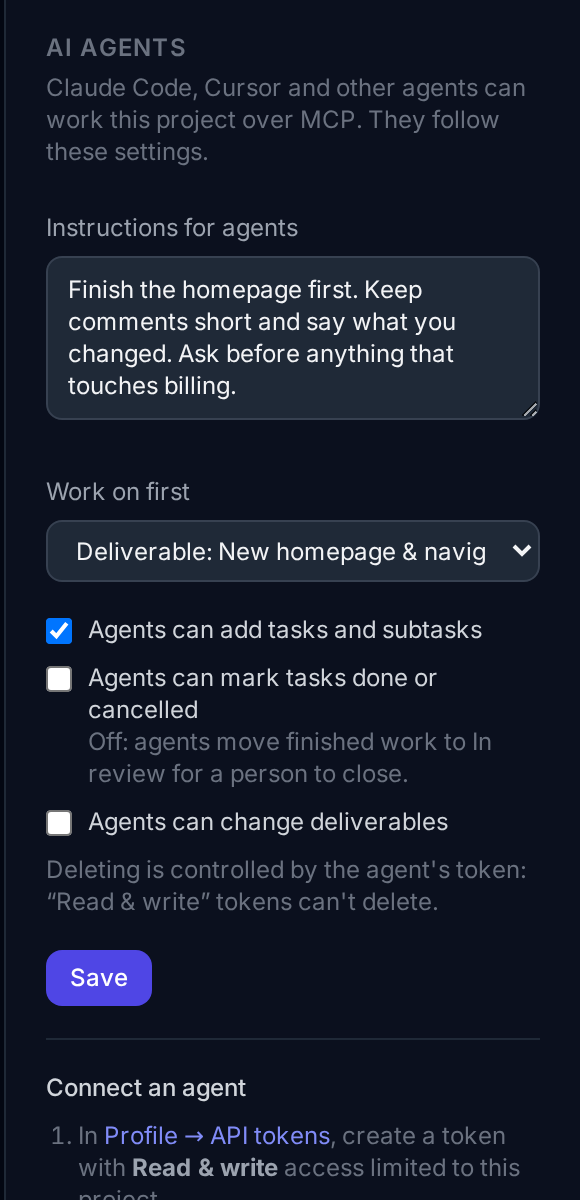
Rank the work, pick a deliverable to finish first, and write short instructions. That's what the agent reads before it starts.
2
Assign a task to the agent
Agents appear in every assignee menu next to your teammates. Ask the agent to work its queue, or run the optional watcher and moving a task to In progress starts it.
3
Review and close
The agent posts its work as comments and moves the task to In review. You read it, then close it or send it back.
The brief is the boss
Every project has an agent brief: your instructions, the deliverable to work on first, and a ranked queue of open work. Tasks assigned to the agent come first. The agent reads it at the start of every task, so it works your priorities, not whatever was in the chat.
Guardrails you can see
- The server enforces the rules, not just the prompt. By default agents can't mark tasks done, so a person reviews every result. They can't edit deliverables either.
- One token per agent, limited to one project and unable to delete anything. Revoke it any time.
- Agents can't change their own rules, or touch account, billing or organization settings.
- Every change is labelled “via <agent>” in the activity history.
- The optional auto-start watcher runs Claude with no shell, file or web access, one task at a time.
See what it did
The agent's work lands where your team already looks: comments on the task, the card in In review, and every change labelled “via <agent>” in the history. Progress rolls up to the deliverable like any teammate's.
We run our own roadmap this way
TaskPebble's own roadmap lives in TaskPebble, with Claude assigned the tasks it can do. On its first automatic run, moving a task to In progress produced a design, a code draft and a test checklist as comments. The task was in review 38 seconds later.
Works with your agent
TaskPebble speaks MCP, the standard way AI assistants connect to apps. Connect Claude Code with one command, or Cursor, Claude Desktop or any MCP client with a short config. See the setup guide.
Pricing
$5 a month: give your agent a job. Agents need API tokens, which start on the Personal plan. Free: try the board. Personal ($5): agents for one person. Team ($39, flat): agents plus up to 15 people. Compare plans.
Your agent runs on your own Claude, Cursor or other subscription. TaskPebble doesn't charge for agent requests, and agents don't take a seat.
Questions
Can the agent change our code?+
Not through TaskPebble: it only gets project-management tools. The optional auto-start watcher runs Claude Code with no shell, file or web access. If you want an agent to work in your repository too, run it there yourself with its own tools.
Does TaskPebble include the AI?+
No. You bring your own agent: Claude Code, Cursor or any MCP client, running on your own subscription. TaskPebble provides the board, the rules and the connection, and doesn't charge for agent requests.
What if a task contains instructions meant to trick the agent?+
The agent is told to treat task text as information, not instructions, and its token only reaches one project. By default it can't delete, close tasks or change settings, so the worst case is a bad comment or draft that you send back. Only connect agents to projects whose content you trust.
What can the agent see?+
Only what its token allows: usually one project's tasks, comments and brief. It can't see your account, billing or other projects.
How do I stop an agent?+
Revoke its token in Profile → API tokens. It stops working immediately.
Does it work on the Free plan?+
Agents need API tokens, which start on the Personal plan ($5/month). You can try the board itself for free.
Does the agent take a seat?+
No. Agents are assignees, not user accounts, so they don't count toward your plan's people limit.
Give your agent its first task.
Agents start on the Personal plan, $5 a month. Your agent runs on your own subscription.